If you’ve ever stood in front of a bright COB LED display in a busy mall, concert, or even a retail store window and squinted for no obvious reason, or noticed your phone camera showing weird dark bands when you try to take a photo of it, you might have wondered: Does a COB LED display flicker? As a supplier who’s spent the last 8 years working directly with clients to fix display issues and debunk common myths, I’ve fielded this question at least once a week, from small business owners buying a single storefront sign to event planners renting 50-square-meter displays for major festivals. And the answer isn’t a simple yes or no—it depends on a few key, easy-to-miss details about how the display is built and powered. Let me break this down in plain terms, no jargon, and share what I’ve learned from working with hundreds of clients. COB LED Display
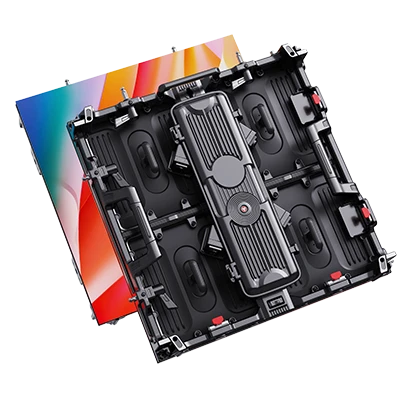
First, let’s get clear on what COB LED actually is, because that’s the root of a lot of confusion. COB stands for Chip-On-Board, which means instead of mounting individual small LED chips on a circuit board (what you see in older SMD displays), manufacturers glue dozens of tiny LED chips directly onto a single small board, then cover them with a clear phosphor layer to create a single, smooth light-emitting surface. The big selling point of COB is that it eliminates the dark gaps between individual LEDs that make SMD displays look grainy from close up, and it’s supposed to be more durable, too. But that surface smoothness can make flicker way more noticeable than it is on SMD displays, because there’s nowhere for the eye to hide the tiny flashes.
Now, what is flicker, exactly? Most people think flicker is just a visible pulse of light, but it’s actually the frequency of the light’s brightness changing over time, measured in hertz (Hz). For context, regular incandescent bulbs run on 50 or 60 Hz AC power, so their flicker is at 100 or 120 Hz (twice the AC frequency), and most people don’t notice that because it’s fast enough that the human eye’s persistence of vision blends it into steady light. But if that frequency drops below about 100 Hz, it becomes noticeable, and anything below 50 Hz is really obvious—you might get headaches, eye strain, or even motion sickness from it, especially if you’re looking at the display for long periods, like at a trade show or a retail checkout line.
Here’s the thing about COB displays: not all of them are built the same way. A lot of cheaper, off-brand COB displays you might find on Amazon or at a trade show pop-up use a low-end power supply and a cheap driver board that runs the display at a low refresh rate. That’s where the flicker comes from, not the COB technology itself. I once had a local café client who bought a $1,200 COB menu board that kept their baristas complaining of headaches after 8-hour shifts. When we tested it, we found it was running at a 60 Hz refresh rate—right around the threshold where flicker starts to become visible to many people. We swapped out the driver board for a better quality unit, and the flicker disappeared entirely; the baristas didn’t mention a single headache after that.
What’s a “good” refresh rate for a COB display? Most professional grade COB displays, like the ones we supply, run at a refresh rate of at least 1920 Hz, and many go up to 3840 Hz or even higher for high-end models. At that speed, the individual brightness pulses are so fast that the human eye can’t pick them up, and even smartphone cameras— which have gotten way better at detecting flicker than the human eye—won’t show those weird dark bands when you take a photo. I test every display we ship before it leaves our warehouse, because I’ve seen clients get burned by cheap displays that claim to be COB but skip on the driver tech. Last year, a concert rental client came to us after a different supplier sent a 20-square-meter COB display that showed obvious flicker when the press started taking photos backstage; we swapped it for our high-refresh model, and there were zero issues throughout the two-day festival.
Another common misconception is that brightness dimming causes flicker. If you’re using a display to show a dimmer image at night, for example, does that make it flicker? Again, it depends on how the display does dimming. There are two main ways to dim LEDs: analog dimming and pulse-width modulation (PWM) dimming. Analog dimming works by lowering the actual voltage to the LED chips, so their brightness stays steady, just lower overall. PWM dimming works by turning the LEDs on and off very fast, like a strobe, to create the illusion of dimmer light— and if the frequency is low, that creates flicker. Most cheap COB displays use PWM dimming, especially at low brightness levels, because it’s cheaper to implement. Our displays use analog dimming at most brightness levels, and PWM only at very low brightness where analog dimming would cause color distortion, and even then we run that PWM at over 5000 Hz so it’s completely unnoticeable. I remember a client who runs a drive-in theater who tested three different COB displays for their screen. The first two had visible flicker when showing dark movie scenes, but our display had no issues—they even tested it by running it alongside their old SMD display that had similar specs, and our COB one was way more comfortable to watch for 2-hour movies.
Wait, but what about the new “flicker-free” label I see on some displays? That’s not just marketing. The Federal Trade Commission and other global safety agencies don’t have an official definition for “flicker-free,” but most reputable suppliers use the term to mean a display with a refresh rate above 1000 Hz, and dimming that doesn’t cause visible flicker. A lot of cheap brands will slap “flicker-free” on their boxes just because they use COB chips, so always ask for a refresh rate specification if that’s a concern for you. I always tell my clients: if you’re buying a display for a space where people will look at it for more than 15 minutes at a time—like an office lobby, a classroom, a retail store, or a bar—you need to prioritize refresh rate over surface smoothness alone. A cheap COB display with low refresh rate will give more eye strain than a slightly more expensive SMD display with a high refresh rate, because the SMD has gaps but the flicker is less noticeable, and the eye doesn’t get as tired.
I’ve also had clients ask about eye strain specifically, and whether COB flicker is the cause of that. A 2021 study from the University of California, Berkeley, looked at light source flicker and its impact on visual discomfort, and found that flicker below 100 Hz was linked to a 30% higher rate of self-reported eye strain after 2 hours of exposure, compared to light sources with flicker above 1000 Hz. That aligns perfectly with what I’ve seen in my own work. One of our regular school clients replaced all their classroom whiteboards with COB displays two years ago. Before that, teachers were reporting an average of 2-3 days of headaches a month from using the displays for lessons. After switching to our high-refresh COB models, that number dropped to less than half a day a month. It’s a small change, but it makes a huge difference for both teachers and students who stare at the screen all day.
There’s one more case where flicker can pop up on even a good quality COB display, and that’s if the power supply is faulty or incompatible. I once had a tech support call from a hotel client whose ballroom COB display started flickering out of nowhere a week after installation. We sent a technician out, and it turned out the electrical circuit in the ballroom was overloaded, so the power supply to the display was getting inconsistent voltage. Swapping the circuit and upgrading the power supply fixed it immediately. It’s rare, but it’s a good thing to check if you have a COB display that starts flickering suddenly, instead of blaming the COB tech itself.
So to wrap this up: Yes, a COB LED display can flicker, but only if it’s built with low quality components—low refresh rate drivers, bad dimming tech, or cheap power supplies. The COB design itself doesn’t cause flicker; it just makes it more visible when it does happen, because of the smooth, gap-free surface. If you’re shopping for a COB display and you’re concerned about flicker (which you should be, if it’s going to be in a space with long viewing times), here’s what to look for: a refresh rate of at least 1920 Hz, preferably 3840 Hz or higher; dimming that doesn’t cause visible flicker (ask for a demo if possible); and a reputable supplier that tests every unit before shipping, instead of a no-name brand that cuts corners on parts.
At the end of the day, my job as a COB LED display supplier isn’t just to sell you a screen—it’s to make sure it works for your specific needs, whether that’s a 24/7 retail window, a classroom where kids use it all day, or a concert that needs to look perfect for photographers. If you’re in the market for a new display and want to talk through whether COB is right for you, or you have questions about refresh rates and flicker for your space, I’d be happy to walk through it with you. No sales pitch, just honest advice based on years of working with different clients and fixing display issues.

Let’s connect to discuss your specific display requirements and find the right solution for you.
Indoor LED Display References
International Electrotechnical Commission (IEC). 2018. Light Sources and Lamp Systems – Measurement of Flicker. IEC 62386-207:2018.
University of California, Berkeley School of Optometry. 2021. The Impact of Light Flicker on Visual Discomfort and Eye Strain. Journal of Visual Communication and Image Representation, vol. 78.
Illuminating Engineering Society (IES). 2020. Recommended Practice for Lighting for Office and Classroom Environments. IES RP-1-20.
LiKYLIN (Chongqing) Intelligent Technology Co., Ltd.
As one of the most professional cob led display manufacturers and suppliers in China, we’re featured by quality products and low price. Please rest assured to wholesale advanced cob led display in stock here and get free sample from our factory. We also accept customized orders.
Address: Building 1, No.57, Jinfu Blvd, Gu’nan Street, Qijiang District, Chongqing, China
E-mail: marketing@likylin-led.com
WebSite: https://www.cqlikylinled.com/
